
 English

 Nicolau Lobato Airport, Dili, Timor-leste
Scan a QR code to effortlessly connect to the local high-speed data network through an eSIM-compatible device anywhere and anytime. Enjoy competitive rates, reliability, and dedicated customer support.
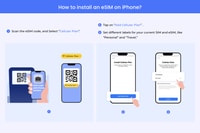
Goodbye to the inconvenience of carrying multiple physical SIM cards and the arduous task of visiting mobile network operators' outlets for installation services. Our e-SIM service simplifies connectivity by providing users with an easy-to-install digital SIM card. Upon making a purchase, customers will obtain a QR code which they can scan on their compatible device to seamlessly activate the e-SIM anywhere and anytime they require.
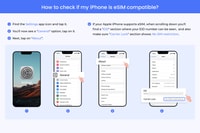
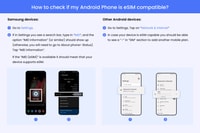
Our product lineup offers a variety of data plans, duration options, and geographic coverage across diverse regions, ensuring seamless communication at your fingertips. A broad spectrum of iPhone model generations, including those beyond the XS series, supports the e-SIM technology. For additional verification regarding device compatibility, kindly refer to the included photo session guide. To share the QR code, utilize either the AirDrop feature or manually scan it onto another device.
To activate the e-SIM, connect your device to Wi-Fi or establish a network connection first. Ensure that the e-SIM is enabled for roaming functionalities. Should issues arise during the process, consult our troubleshooting manual for assistance.
In case your e-SIM's data usage has depleted, simply replace it with a new one to restore your connectivity. Remember, the APN (Access Point Name) configuration for this specific e-SIM is set as "iboots" and its local network association is linked to Viettel.
 Book
Book
| Highlights | While traveling, maintain seamless connectivity by scanning the QR code for installing the e-SIM service. Enjoy high-speed LTE/5G networks at your fingertips. You can easily purchase or top up your disposable data plan at any time and from anywhere. No physical disposals have been made thus far. |
|---|---|
| Includes | The LTE/5G network exhibits excellent coverage and offers high data speeds. Additionally, the system includes hotspot functionality for easy connectivity. In case the eSIM becomes inadvertently deleted, the device will automatically reinstall itself upon startup. Customer service is available via email, providing assistance should any issues arise. Voice communication and text messaging services are also supported. |

Free cancellation
Cancellation up to 24 hours prior will entitle to a full refund.

Reserve now & pay later
Please maintain flexibility with your travel arrangements; booking your spot and making payment is available immediately.

Valid 7 - 30 days
Please verify the availability to ascertain the commencement times.
Please maintain flexibility with your travel arrangements; booking your spot and making payment is available immediately.
Check Availability
Nicolau Lobato Airport, Dili, Timor-leste  See on map
Scanning a QR code allows users to easily connect to the local high-speed data network through an eSIM-compatible device.
The eSIM service simplifies connectivity by providing users with an easy-to-install digital SIM card, eliminating the need for multiple physical SIM cards and the hassle of visiting mobile network operator outlets for installation services.
The e-SIM technology supports various devices, including those from different iPhone model generations, such as those beyond the XS series.
Yes, for additional verification regarding device compatibility, please refer to the included photo session guide.
You can share the QR code via either the AirDrop feature or manually scan it onto another device.
Connect your device to Wi-Fi or establish a network connection first. Ensure that the e-SIM is enabled for roaming functionalities. In case of any issues, consult our troubleshooting manual for assistance.
The default APN configuration for this specific e-SIM is 'iboots' and its local network association is linked to Viettel.

Subscribe to our newsletter and get the best offers!
By entering your email address, you agree to receive personalized offers and automated commercial communications, including promotions about our products and services, as well as those from selected partners (without sharing your data with third parties). For more details or to withdraw your consent, please refer to our Privacy Policy. You can unsubscribe at any time via the link in the email.
 Español
  Français
  Deutsch
  Italiano
  Nederlands
  Português
  Русский
  中文
中文  日本語
日本語 

 Give as a gift